






If you’d like me to cover anything not featured here, please leave a comment or contact me.
PCSX2 Settings
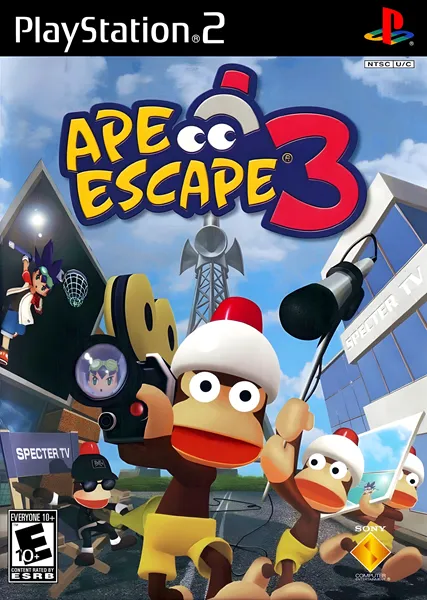
I had trouble getting Ape Escape 3 to run at a consistent 60 FPS on the PCSX2 emulator. My PC hardware should be more than capable of doing so. Looking things up online, it appears the game has framerate drops on actual PS2 hardware. It’s been ages since I played my disc copy, so I can’t verify this claim, or even where the drops occur.
On PCSX2, I experienced drops with default settings whenever the camera suddenly panned over to show multiple Monkeys, and also when pre-placed Gotcha Coin models transformed into their higher-value variants. Everything I tried in the emulator’s settings just made things worse, so I assume these drops are inherent to the game. If that’s the case, this is an unfixable problem until someone codes game-specific fixes for Ape Escape 3. To my knowledge, no one has done so at the time of my writing this.
If you have further details about what causes dropped frames in Ape Escape 3, or how to fix them, please leave a comment or contact me.
Player Characters and Differences
- You cannot swap playable characters after starting the game. You’re forever stuck with whoever you choose.
- Kei (the boy) and Yumi (the girl) have exactly the same gameplay traits, with one exception, listed below.
- Yumi has the ability to charm specific Monkeys. This happens automatically when they’re approached, and it immobilizes Monkeys, making them trivial to capture.
- Kei has no special benefits of any kind, effectively making Yumi a soft “easy” difficulty mode. However, there aren’t that many Monkeys capable of being charmed, so it’s a pretty superfluous mechanic, albeit strange. Just pick whoever you want, as you’ll get about the same game experience.
- There are many non-gameplay differences between the two characters. Cutscenes that feature only one of the two leads, like pre-boss encounters, naturally have altered dialogue. The character you don’t choose will occasionally appear alongside Aki to offer advice during missions, so those lines likewise change.
- While all Morphs play exactly the same for both characters, the appearance for each one are radically different. The first Morph transforms Kei into a traditional medieval knight, while Yumi becomes a stereotypical mage equipped with a magic wand. All Morph names are the same, making this one’s “Fantasy Knight” title a misnomer for Yumi, but whatever. Anyway, it’s a super cool touch, and you might want to look up the costumes for the character you don’t pick. Or both characters, if you don’t mind spoiling Morphs to help you decide what you want your character to look like.
General Gameplay Tips
- Repeatedly pressing one of the face buttons where you assign Gadgets opens up a horizontal, Gadget mini-menu over that button. Each button press moves the menu one slot to the right. You can use this to quickly change Gadgets without opening the normal menu, which is pretty nifty. Use it to avoid interrupting your gameplay.
- Similar in purpose to the quick Gadget swapping mentioned above, there’s a Quick Morph option. This is actually disabled by default, so you’ll have to turn it on in the options menu. Once enabled, go into the main menu’s Quick Morph section and select a Morph, and you’ll transform into them the instant you Morph Jump.
I found the Morph Jump menu to be pretty quick, so this isn’t a huge time-saver. It’s still nice for things like Time Trials, where you’ll often be repeating the same actions. When you need to choose different Morphs again, just reassign Quick Morph or turn the mechanic off entirely in the options menu. - Morph Jumps being assigned to pressing R1 and R2 simultaneously means the series’s dash technique has been removed. I don’t know if anyone ever used that, but I figured I should mention it somewhere.
Shops
- Lucky Tickets randomly give you any item currently sold in the shops. This is the equivalent of the Gotcha Box from Ape Escape 2. The reason to buy Lucky Tickets instead of a specific item is that Tickets always cost 30 Coins, yet can reward you with items sold for higher amounts. It’s possible, for example, to buy a Lucky Ticket for 30 Coins and receive an item normally worth 200 coins. Of course, the opposite is true, too, as you can get an item that sells for less than 30 Coins. If you have no item preference and just want 100% completion, Lucky Tickets are the way to go.
- Early on, there’s not much of a reason to buy anything other than Morph Drives to use Morphs more often. The maximum number of drives is 10, so that should cost a total of 3000 Coins. With how many coins AE3 throws at you, however, you can max out your drives as early as the third boss. At least, that’s what I did. Of course, if you want to spend your Coins on bonus material instead, go ahead. I think you can carry way more Drives than you’ll ever need, anyway.
- The two special Pellet types are no longer found in stages or dropped by enemies; they must be purchased. On the flip-side, your maximum capacity is now 99 from the start. For better or worse, Explosive Pellets are not as helpful as they are in Ape Escape 2. There, they were essential for boss Time Trials, as they could damage bosses outside of their most vulnerable points. In AE3, Morphs are capable of doing this, and are typically much better at it, so buying Pellets is very unnecessary.
Time Trials
- I recommend waiting to complete time trials until you acquire the third Morph, Miracle Ninja. The time thresholds in Ape Escape 3 are very strict, seemingly being designed around having access to everything in the game. By the time you unlock Miracle Ninja, you’ll have pretty much everything you need to complete Time Trials more efficiently, however.
- A good rule of thumb in Ape Escape 3 is to always remember the acronym ABN: Always Be Ninja. The Miracle Ninja Morph is ridiculously overpowered. It can attack with minimal speed loss, capture Monkeys from a distance, has a basic run speed on par with the Super Hoop, and can glide using the Flying Squirrel.
In Time Trials, you should transform the instant you can, so as to immediately gain the benefits of faster movement. There are, of course, moments when you’ll need to use Gadgets or other Morphs, but for general purposes, Ninja is the way to go. You can make things more convenient by enabling the Quick Morph feature in the options menu, then setting your Quick Morph to be the Miracle Ninja.
Leave a Reply